
Install Sample App
Install the target/logpresso-sample-app-1.1.2608.0.app file the build produced. Go to the Apps menu in the Logpresso Sonar web console and upload the app file.
Once installation finishes, you can use the capabilities the app extends. The sample app adds a connect profile type, query commands, and a web console screen.
The sample app calls the Logpresso Sonar REST API, so it needs an API key. In the Users menu, edit the account you want to use, and under Basic Settings click Generate in the API key field. See the user guide for details.
Configure connect profile
You can navigate to the Connect Profile menu and click the Add button to select a Sample connect profile type that has been extended by your app, as shown below.
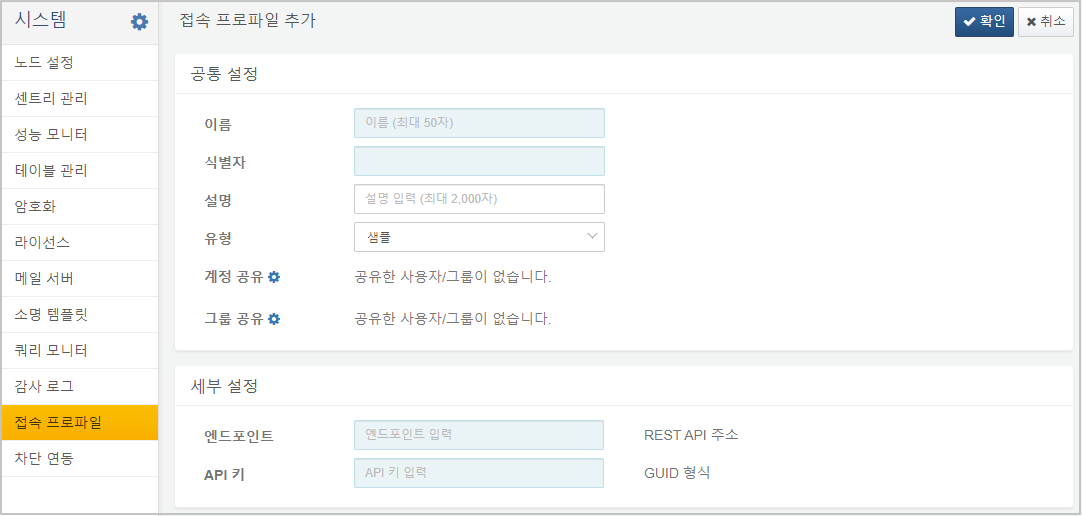
Add a connect profile by entering https://YOUR_LOGPRESSO_IP in the Endpoint property and the API key you just issued in the API Key field.
Test query commands
Now, when you run the sample-subnet-groups command in the query menu, you see 1 result, as shown below:

If the API key setting is incorrect, a 401 Unauthorized error will occur when executing the query as shown below:

Check the app screen
The sample app serves the same data as a screen as well. Select Subnet Groups under the Sample App menu and the subnet group list of the Logpresso instance the connect profile points at appears.
You can pick the connect profile at the top of the screen. Without a connect profile registered, the screen shows a message telling you to register one instead of a list.
XDR UI explains how this screen is implemented.
Now let's take a look at how to extend query commands in your Logpresso app.