
Read Me
How Data Is Collected and Processed
The smallest unit of data processed by Logpresso Sonar is a record, defined as "a single, complete logical unit of data." Examples include:
- A single line of logs from a firewall or web server
- A single syslog message
- A single SNMP trap message
- A single row stored in a relational database table
- A single document stored in a MongoDB collection
- A single packet found in a file collected via a PCAP device
- A JSON object (a set of name-value pairs enclosed in curly braces) received as a response to a call to an external REST API.
All of the above are treated as records in Logpresso Sonar.
The Loggers menu consists of four components: Loggers, Parsers, Log Schemas, and Logger Models. When you install an app from Logpresso Store, the necessary parser, log schema, and logger model to collect and process data from the source are automatically provided. Administrators only need to configure the logger (and, if required, a connect Profile) to begin data processing. However, understanding how each component works—and how they interact—is key to leveraging the collection functionality effectively.
The following diagram illustrates how data is processed in Logpresso Sonar.
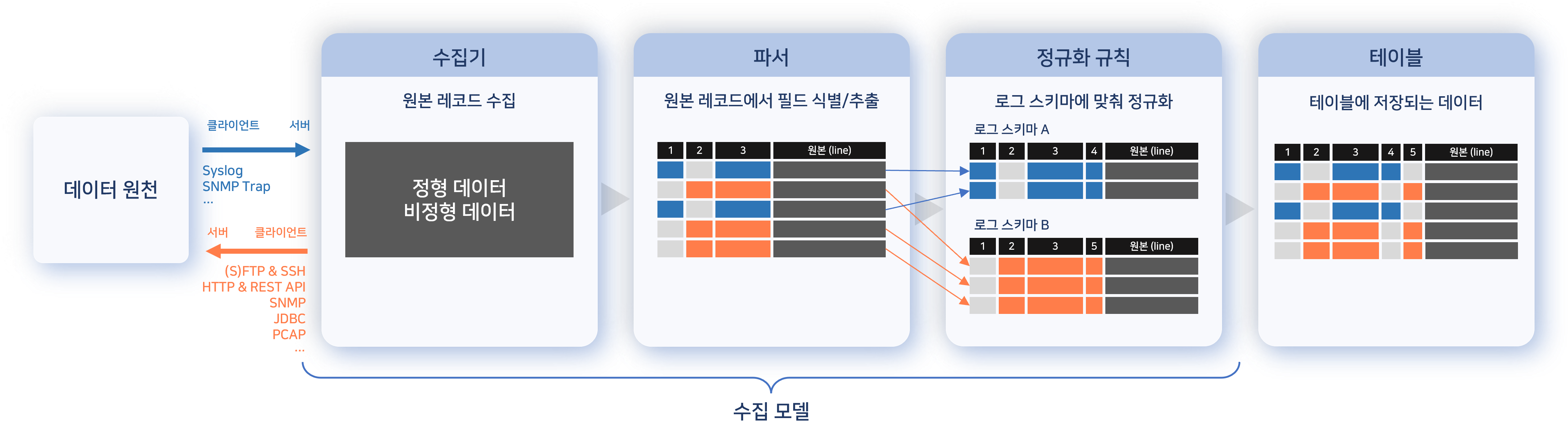
- The logger receives data from the data source, or periodically connects to the source to collect it.
- In the illustration, the arrows represent the communication direction at the TCP/IP or application level.
- The parser, defined in the logger model, processes data record by record, extracting and identifying fields.
- If normalization rules are defined, extracted fields and values are converted to match the field names and types defined in the log schema.
- The normalized records are stored in a table, preserving both the normalized fields and the original logs.
This process is essential for establishing consistent policies and enabling efficient data analysis. Although logs from heterogeneous systems vary in format, they often share common attributes. Normalizing these attributes enables seamless policy setup and analysis.
For example, logs from different firewalls may use different formats. Once normalized to a common schema, source IP addresses can be compared against blocklists defined in the Address Group across all firewalls.
Streamlined Log/Data Collection Mechanism
The introduction of the App system has greatly simplified the log and data collection setup process, minimizing the manual effort required by administrators. Installing an app automatically configures all necessary parsers, log schemas, and ingestion models for collecting and processing data from the target system.
The updated data collection setup process is as follows:
| Before 4.0.2308.0 | After 4.0.2308.0 |
|---|---|
| 1. Configure log schema | 1. Download the app from the Logpresso Store |
| 2. Configure log parser | 2. Install app |
| 3. Configure normalization parser | 3. Set up data source connections, such as connect profiles |
| 4. Configure logger model | 4. Create logger |
| 5. Configure extraction model | - |
| 6. Create logger | - |
Although administrators retain the option to manually configure parsers, log schemas, and logger models, the app system significantly reduces the need for most manual configurations. In most cases, administrators can rely on the pre-configured components provided by the app, enabling a faster and more efficient setup process.
Multilanguage Support for Log Schema
The log schema now supports Korean, English, and Chinese. When requesting an explanation from an employee, the field names in the supporting logs are displayed in the user's preferred language, ensuring clarity and ease of understanding.
When Data Collection Is Not Available Out Of the Box
Request App Development
If an appropriate app is not available in the Logpresso Store for your data source, you may request custom development from Logpresso. Please include the following details with your request:
- Information about your organization
- Manufacturer, product name, and version of the system to be integrated
- Methods used to collect logs
- Log specifications (for databases, include schema and table definitions)
- Sample logs
Develope Your Own App
Logpresso provides an app SDK that enables you to develop your own integration for Logpresso Sonar or Logpresso Maestro. For detailed guidance, refer to the Logpresso App Development Guide.