
Threat Intelligence Feeds
Overview
Logpresso provides Cyber Threat Intelligence (CTI) services through Logpresso CTI to help organizations effectively respond to the latest and known threats. These services collect, analyze, and share various up-to-date threat information, enabling organizations to quickly identify and respond to cyber threats.
Logpresso CTI
Installing Logpresso Sonar provides a list of Logpresso CTI feeds.
| Name | STR_FEED* | Type | Description |
|---|---|---|---|
| Logpresso CTI IP | logpresso_cti_ip | IP | Malicious IP addresses related to cyber attacks |
| Logpresso CTI Domain | logpresso_cti_domain | DOMAIN | Malicious domains such as malware distribution sites and C&C servers |
| Logpresso CTI URL | logpresso_cti_url | URL | Indicators of compromise (IoCs) for malicious URLs |
| Logpresso CTI MD5 | logpresso_cti_md5 | MD5 | MD5 hash-based indicators of compromise |
| Logpresso CTI SHA1 | logpresso_cti_sha1 | SHA1 | SHA1 hash-based indicators of compromise |
| Logpresso CTI SHA256 | logpresso_cti_sha256 | SHA256 | SHA256 hash-based indicators of compromise |
* For STR_FEED, refer to the name=STR_FEED option in the matchfeed command.
To utilize Logpresso CTI::
- A subscription is required. Paid subscribers receive real-time feeds, while free subscribers have access to feeds with a 90-day delay.
- Configure network security policies to allow Logpresso Sonar to connect to the Logpresso CTI service. Apps that provide CTI services also require network access to their respective service providers.
- Configure a connection profile for the Logpresso CTI server within the Logpresso platform. See Connection Profile for details.
CTI Provided by Apps
Apps such as S2W Quaxar from the Logpresso Store provide threat intelligence. After installing the app, you can access its CTI feeds from the Threat Intelligence list. Check with the CTI service provider regarding subscription requirements.
Search Threat Intelligence Feed
Navigate to Policies > Threat Intelligence to view and search for the latest threat intelligence feeds.
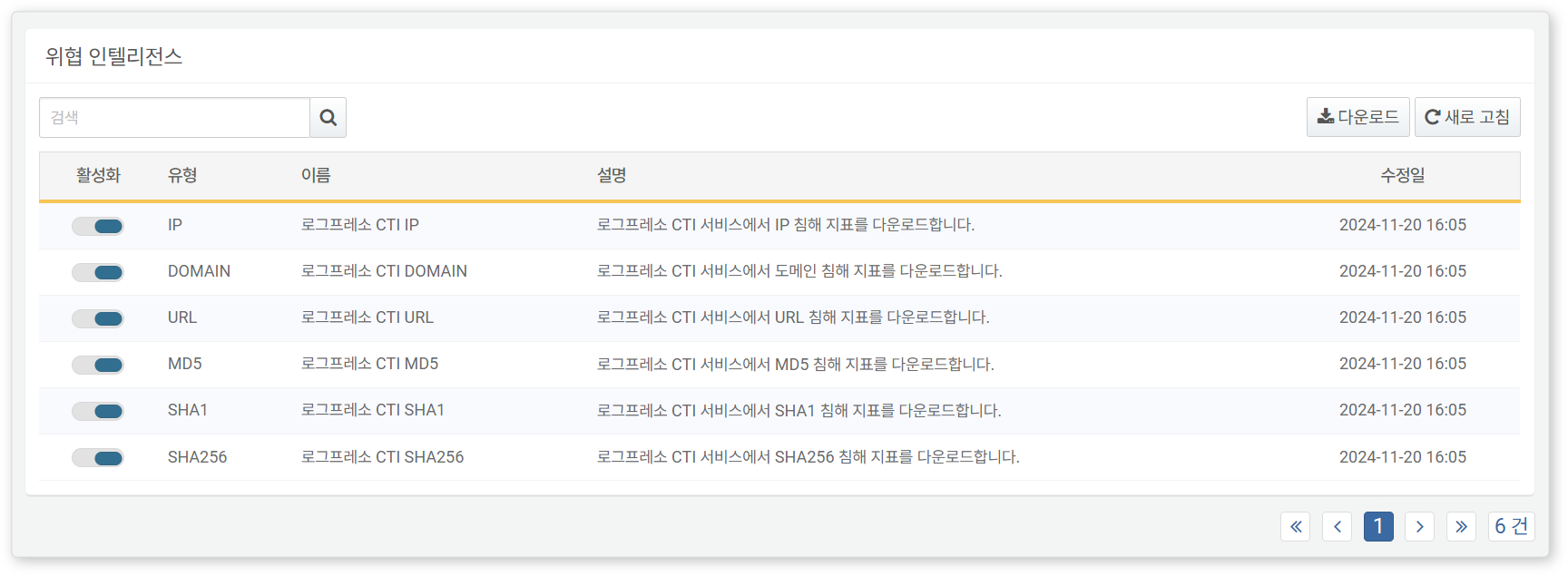
- Enabled: Toggle to enable or disable a threat intelligence feed (
 : On,
: On,  : Off)
 - Type: Type of threat intelligence provided
- IP: Malicious IP addresses used for identifying attack sources or command-and-control servers.
- DOMAIN: Malicious domains associated with phishing sites and malware distribution
- MD5, SHA1, SHA256: Hash values for verifying file integrity and identifying malware
- URL: Malicious web URLs used in malware distribution or phishing attempts
- EMAIL: Compromised email addresses
- Name: Name of the CTI feed
- Description: Description of the CTI feed
- Modified At: Last update date
Use the search tool in the toolbar to find specific threat intelligence feeds. The search function matches the entered keyword against the Name field and is case-insensitive.
Download Threat Intelligence Feed List
To download the list of threat intelligence feeds to your local PC, click Download in the toolbar and select the desired file format.
Refresh Threat Intelligence Feed List
To view the latest threat intelligence data, click Refresh in the toolbar.
Utilizing Threat Intelligence
Threat intelligence feeds can be used in the following ways:
Scenario Builder
When adding or modifying detection rules in Policies > Stream Rules, use the Scenario Builder to integrate threat intelligence.
Below is a summary of threat intelligence feed by input field type. See Rules and Parameters by Field Type for more details.
IP
| Rule | Parameter | Range | Description |
|---|---|---|---|
| IP address is in reputation DB | Reputation DB | Select CTI feed | Filters field values that match the specified reputation DB |
| IP address is in any reputation DB | - | - | Filters field values that appear in any threat intelligence feed |
MD5/SHA1/SHA256
| Rule | Parameter | Range | Description |
|---|---|---|---|
| Matches specific hash value | Hash | Up to 255 characters | Filters field values matching the specified hash |
| Included in any reputation DB | - | - | Filters field values that appear in any threat intelligence feed |
| Included in specific reputation DB | Reputation DB | Select CTI feed | Filters field values that match the specified reputation DB |
URL
| Rule | Parameter | Range | Description |
|---|---|---|---|
| URL is in any reputation DB | - | - | Filters field values that appear in any reputation DB |
| URL is in specific reputation DB | Reputation DB | Select CTI feed | Filters field values that match the specified reputation DB |
DOMAIN
| Rule | Parameter | Range | Description |
|---|---|---|---|
| Domain is in any reputation DB | - | - | Filters field values that appear in any reputation DB |
| Domain is in specific reputation DB | Reputation DB | Select CTI feed | Filters field values that match the specified reputation DB |
Query
When adding or modifying detection rules in Policies > Stream Rules or Policies > Batch Rules, you can use the matchfeed command or matchfeed() function to integrate threat intelligence. Threat intelligence feeds can also be utilized anywhere supports query input.