
Tickets
You can configure the system to generate tickets when a security threat event is suspected in the monitored system. When setting up Stream Rules or Batch Rules, if you specify a Ticket Assignee, a ticket will be automatically created when the corresponding event occurs.
Once a ticket is generated, it may already have an assignee, or an administrator can assign a responsible person directly. The assignee will proceed with the response actions based on the ticket details and supporting materials, document the response history, and then submit an approval request. The approver can review the ticket details and response history before approving or rejecting the request. If the ticket is rejected, the assignee must perform additional work and resubmit the approval request.
The process can be illustrated as follows:
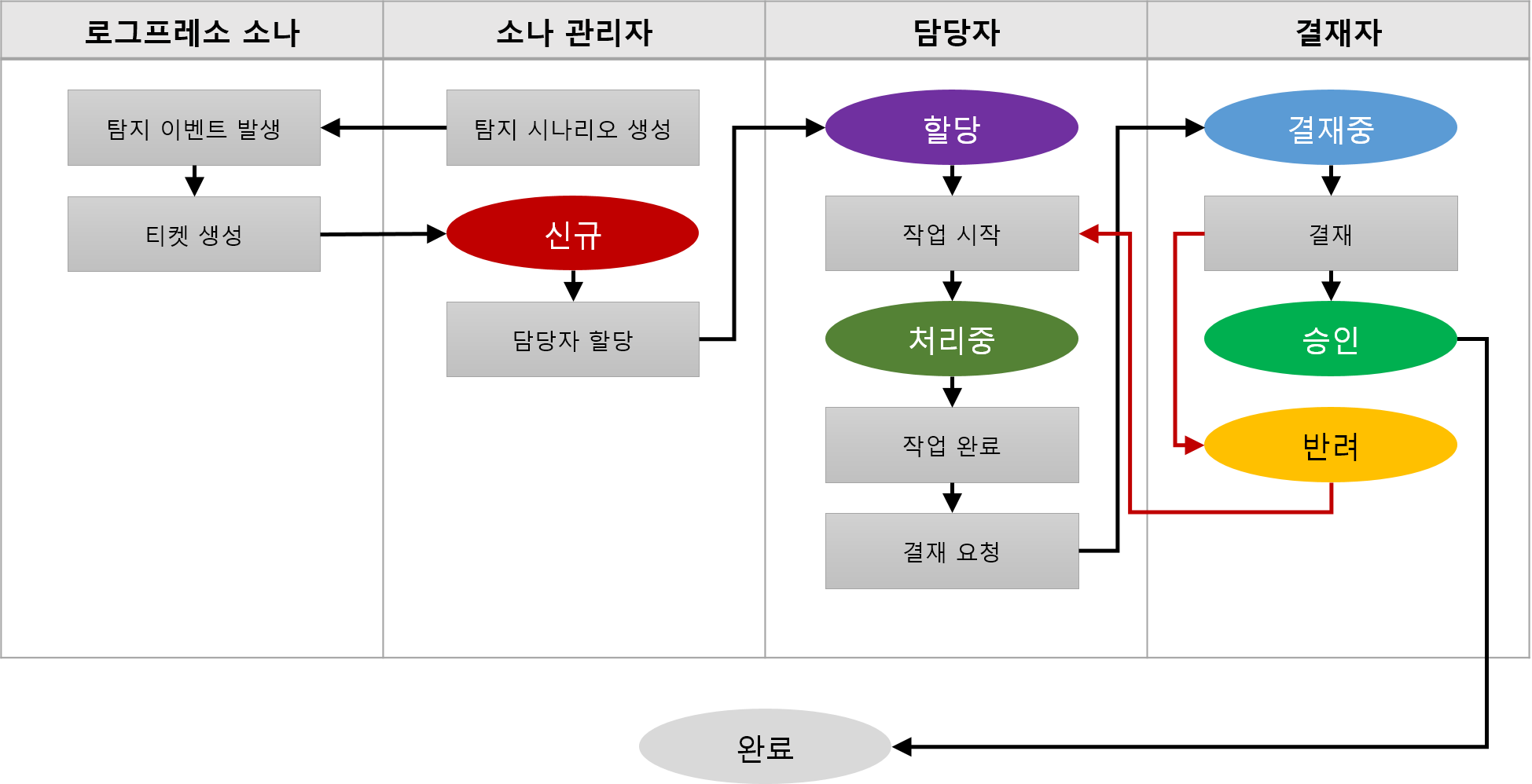
The statuses of tickets are categorized as follows:
- New: The ticket has been created but is not assigned to anyone.
- Assigned: A ticket assignee has been designated.
- In Progress: The ticket assignee is currently working on the task.
- Submitted: The ticket assignee has completed the task and submitted an approval request.
- Approved: The approver has approved the ticket.
- Rejected: The approver has rejected the ticket. The assignee is required to perform additional work.
- Closed: The ticket has been finalized.
Although the ticket processing workflow suggests that a ticket should only be marked as closed after approval by the approver, in practice, a ticket can be set to Closed status from any state, including New, Assigned, or In Progress. Tickets that are duplicates or have already been processed through other means, and do not require the Logpresso Sonar ticket processing workflow, can be marked as closed immediately. Conversely, even closed tickets can be reopened for further action if necessary. When reopened, the ticket will revert from Closed status back to either New or Assigned status, depending on the workflow.