
Machine Learning Model
Overview
A machine learning model is a collection of algorithms that analyze a given dataset to make predictions or decisions. Machine learning enables computing systems to learn from data without explicit programming. The model identifies patterns within the data and applies them to new data for predictions.
Machine Learning Modeling
The entire process of building and utilizing a machine learning model consists of several key steps.
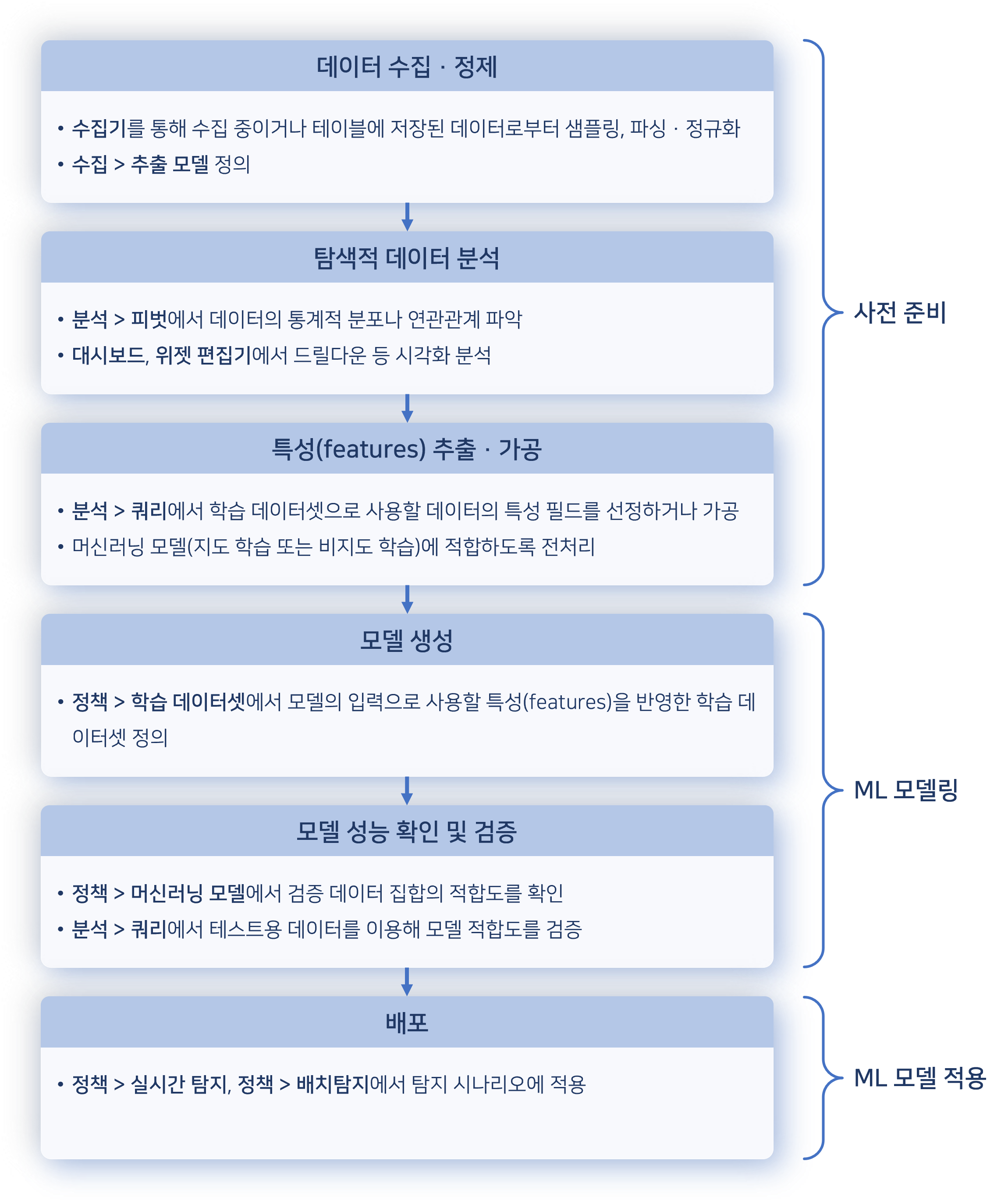
The data collection and preprocessing stage involves gathering data from various sources and refining it. Users can analyze data through Analysis > Queries and Analysis > Pivots to understand statistical distributions and relationships.
Since machine learning models perform best with numerical data, text-based fields should be converted into numerical representations. If field values are strings, they need to be converted into categorical numbers like 0, 1, 2, or transformed into numerical vectors using one-hot encoding. String values that cannot be categorized may be considered for TF-IDF vectorization, where TF stands for term frequency and IDF stands for inverse document frequency.
After completing these preprocessing steps, users can prepare a training dataset and generate a machine learning model based on it.
Logpresso Sonar provides machine learning models that support both supervised learning and unsupervised learning.
Supervised Learning: Random Forest
Logpresso Sonar provides a Random Forest model for supervised learning. Random Forest is an ensemble learning method that improves prediction accuracy by combining multiple decision trees. Compared to a single decision tree, it is more resistant to overfitting, reduces bias and variance, and enhances generalization performance. Its high predictive accuracy makes it particularly useful for analyzing complex, multi-dimensional data such as logs to detect anomalies.
Random Forest is commonly used for classification and regression, with the following prediction aggregation methods:
- Classification: The final prediction is the most frequently chosen class among individual trees.
- Regression: The final prediction is the average of the values predicted by all trees.
Using Random Forest
(1) Prepare Training Dataset The dataset consists of features and target variables.
-
Features: Attributes of the data to be analyzed from collected log data, such as data fields within logs. For example, when using log data collected from a system, features may include IP addresses, event timestamps, and event types.
-
Target Variable: The data field that categorizes each data point, also known as the label. This is typically the field that the machine learning model needs to predict, expressed as numbers, boolean values, or strings depending on the data characteristics. The target variable values in the training dataset serve as guidelines for the model to learn and assist in classifying log patterns.
In supervised learning, target variables are often converted into numerical values to facilitate model training, such as:
- Binary classification value:
1/0(ortrue/false) - Multi-class classification value:
0,1,2(orNormal,Warning,Critical) - A regression analysis value represented as a real number
(2) Model Training The Random Forest model is trained using the dataset that includes the target variable. Once trained, the model can predict the target values for new incoming data.
(3) Prediction & Detection The trained model analyzes real-time log data to detect anomalies. For instance, if an IP address shows an unusually high number of login attempts in a short time, the model may flag it as suspicious and trigger an alert. This enables rapid threat detection and response.
Unsupervised Learning: Isolation Forest for Anomaly Detection
Logpresso Sonar's unsupervised learning model is based on the Isolation Forest algorithm. This model is a variation of the random forest algorithm, designed specifically for detecting anomalies or irregularities in data. Isolation Forest is widely used for identifying unusual transactions, network intrusion detection, and credit card fraud detection.
Unsupervised learning involves analyzing data patterns and structures without predefined labels. The Isolation Forest model operates by measuring the isolation depth, which is the number of splits required to isolate a data point. The anomaly score is calculated by averaging the isolation depths across multiple trees. A lower average isolation depth indicates a higher likelihood of an anomaly. The anomaly score ranges from 0 to 1, with values closer to 1 suggesting a higher probability of abnormality. Data points exceeding a predefined threshold are classified as anomalies.
Using Isolation Forest
(1) Prepare Training Dataset Since Isolation Forest is an unsupervised learning model, there is no need to predefine labels (normal/abnormal). The model is trained directly on system-collected log data.
(2) Model Training The model isolates data points by recursively splitting the dataset into random partitions. Since anomalies are rare, they are often isolated with fewer splits, whereas normal data requires more partitions. This makes anomalies easier to detect.
(3) Prediction & Detection After training, the Isolation Forest model analyzes new log data to detect abnormal patterns. Each log entry is assigned an anomaly score based on its isolation depth. For example, in network traffic analysis, the model can identify suspicious patterns such as unusually high traffic from a specific IP address or unauthorized device connections. When an anomaly is detected, the system immediately generates an alert, allowing for a rapid response.
Pre-Preparation
To use a machine learning model, you will need a training dataset. Refer to ML Datasets to prepare the dataset.
Search ML Model
You can view or search the list of machine learning models under Policies > ML Models.
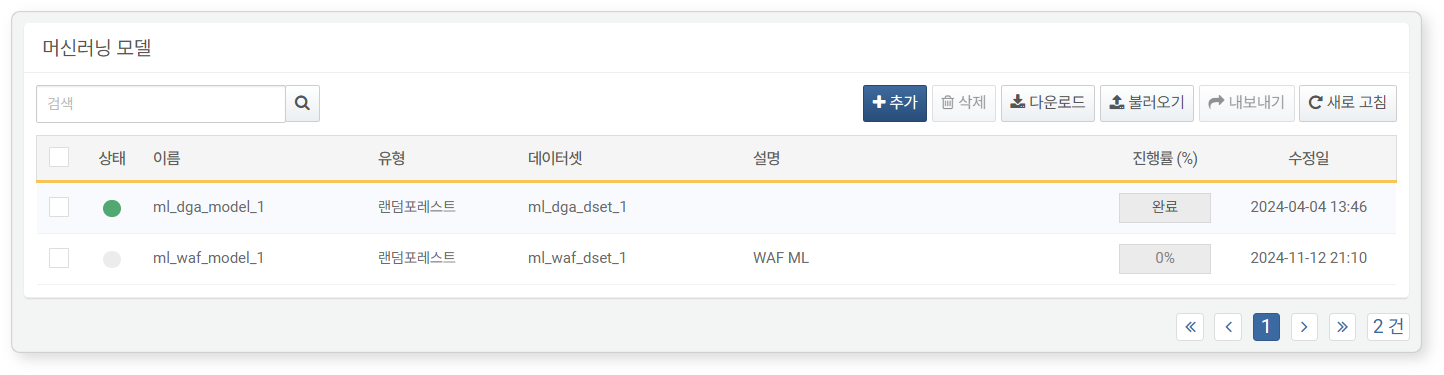
- Status: Indicates the availability of the machine learning model. If the model hasn’t been trained, it can’t be used in detection policies (Green: Available, Gray: Not available).
- Name: Name of the machine learning model.
- Type: Type of machine learning model.
- Datasets: The type of dataset used for the machine learning model (e.g., Random Forest or Isolation Forest).
- Description: Additional information about the machine learning model.
- Process(%): Training progress of the machine learning model, displayed as a percentage while it's being trained.
- Modified At: The date when the machine learning model was created or last modified.
To find a specific machine learning model from the list, use the search tool in the toolbar. The search tool finds models based on the keywords included in Name or Description. The search is not case-sensitive.
Download ML Model List
To download the machine learning model list to your local PC as a file, click Download on the toolbar and select your preferred file format.
Refresh ML Model List
To view the most up-to-date list of machine learning models, click Refresh on the toolbar.
Import/Export ML Model
You can export or import machine learning models as files. This feature is useful for backing up or restoring models.
To export a machine learning model:
- Select the checkbox of the machine learning model row you want to export from the list.
- Click Export on the toolbar.
- In the Export ML Model dialog box, set the name and click OK.
To import a machine learning model:
- Click Import on the toolbar.
- In the Import ML Model dialog box, click Select File and choose the machine learning model file.
- After selecting the file, click OK.
Add ML Model
To add a machine learning model:
- In Policies > ML Models, click Add on the toolbar. You will need a training dataset for machine learning modeling.
- In the New ML Model screen, input the necessary values or select options, then click OK.
- Type: Select the type of machine learning model. Choose Random Forest for predictive analysis or Isolation Forest for anomaly detection.
- Name: Unique name of the machine learning model, which will be referenced in queries (up to 50 characters).
- Description: A description of the machine learning model (up to 2,000 characters)
- Tree Count: The number of decision trees in the machine learning model. More trees provide more stable results, but increase modeling and inference time. Set it appropriately considering performance and efficiency (Default: 100, Range: 1-500).
- ML Dataset: The training dataset used to create the machine learning model
- Target Variable: (For Random Forest models) The data field the machine learning model will predict. For example, If you're creating an anomaly detection model for file access, you can define the normal or abnormal status of each access event as the target variable
- Input Variable: Select the list of fields from the training dataset to be used for model creation.
View ML Model
After the model training is completed, click the Name of the machine learning model to view its performance metrics and model fields.
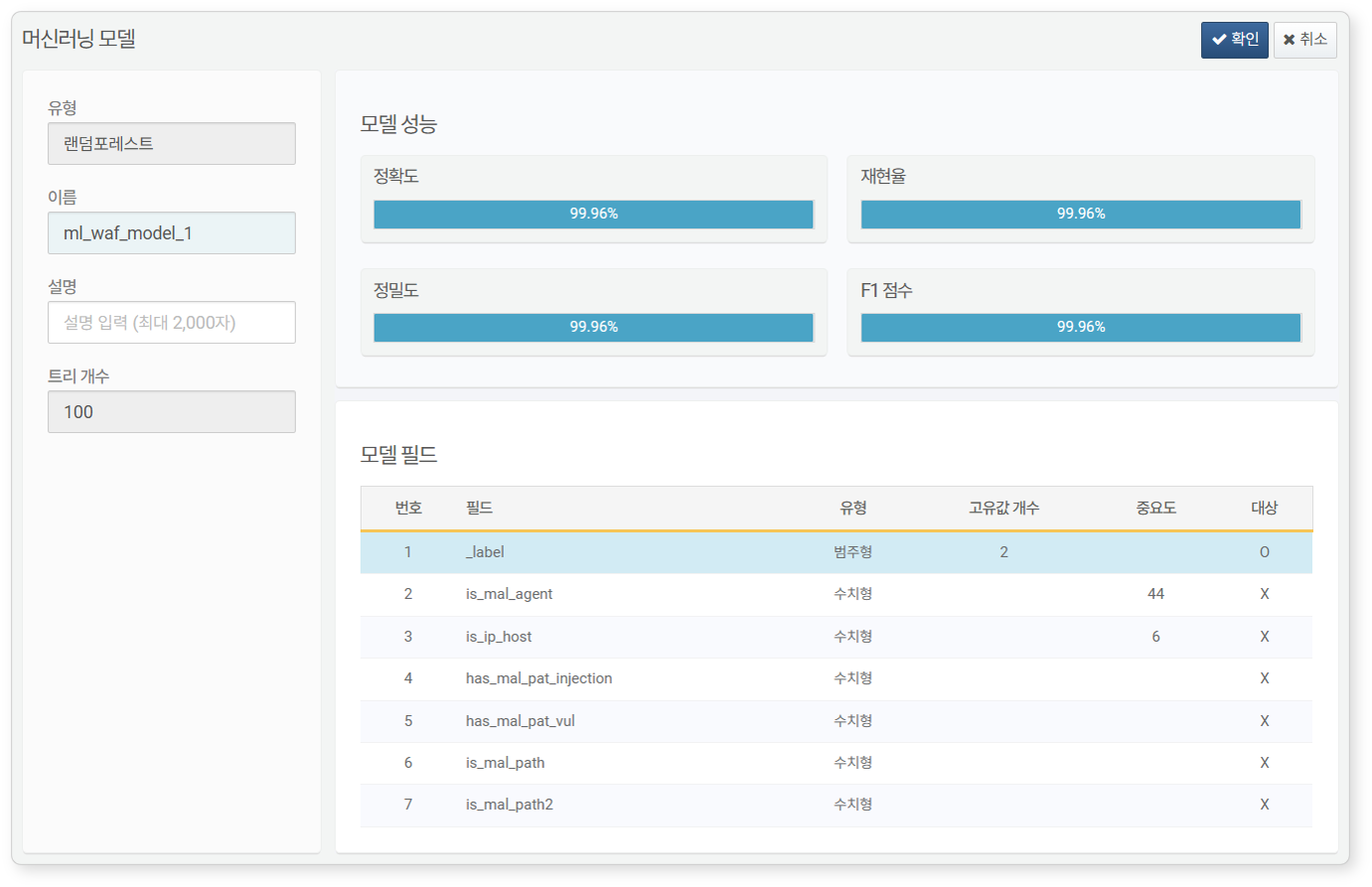
- Performance Metrics: Displayed only for Random Forest models.
- Accuracy: The proportion of samples correctly predicted by the model. Accuracy may not be reliable when using heterogeneous data
- Recall: The proportion of actual positive data points predicted as positive by the model. This metric is important for reducing false positives
- Precision: The proportion of data predicted as positive that are actually positive. This metric is important for reducing false negatives
- F1 Score: The harmonic mean of precision and recall. The score is higher when precision and recall are balanced, and lower when there is a large discrepancy between them.
- Model Fields: Displays the features and target variable fields the machine learning model has learned.
Edit ML Model
To edit a machine learning model:
- Click the name of the machine learning model you want to modify from the list.
- In the Edit ML Model screen, update the information and click OK. You can only modify the Name and Description; other attributes cannot be changed.
Using Machine Learning Model
Once added, you can use the machine learning model in Logpresso queries with the rforest or anomalies commands. To apply the random forest model to input fields, use the rforest command; to apply the isolation forest model, use the anomalies command.
To apply the machine learning model using the rforest or anomalies commands, the input fields must match the fields in the machine learning model. Before using the machine learning command, ensure your data matches the input fields.
Delete ML Model
To delete a machine learning model:
- Select the checkbox of the machine learning model you want to delete from the model list.
- Click Delete on the toolbar.
- In the Delete ML Model dialog box, review the list of machine learning models to be deleted, then click Delete. To cancel the deletion, click Cancel.