
CAPEC
Overview
CAPEC (Common Attack Pattern Enumeration and Classification) is an attack pattern classification system maintained by MITRE. It systematically classifies known cyber attack patterns and provides detailed information for each pattern, including descriptions, execution flows, preconditions, and mitigations. Security analysts can use CAPEC data to identify threats and develop defense strategies.
CAPEC connects with other features as follows:
- In the Related weaknesses section of the CAPEC detail view, you can check the CWE weaknesses exploited by the attack pattern.
- You can map CAPEC IDs to Signatures to manage the relationships between detection patterns and attack types. Click a CAPEC ID in the signature list to navigate to the corresponding CAPEC detail page.
This page is read-only and does not provide add, edit, or delete functions. It is accessible to accounts with user-level permissions or higher.
Browsing and searching CAPEC list
You can browse or search the CAPEC list from Intelligence > CAPEC.
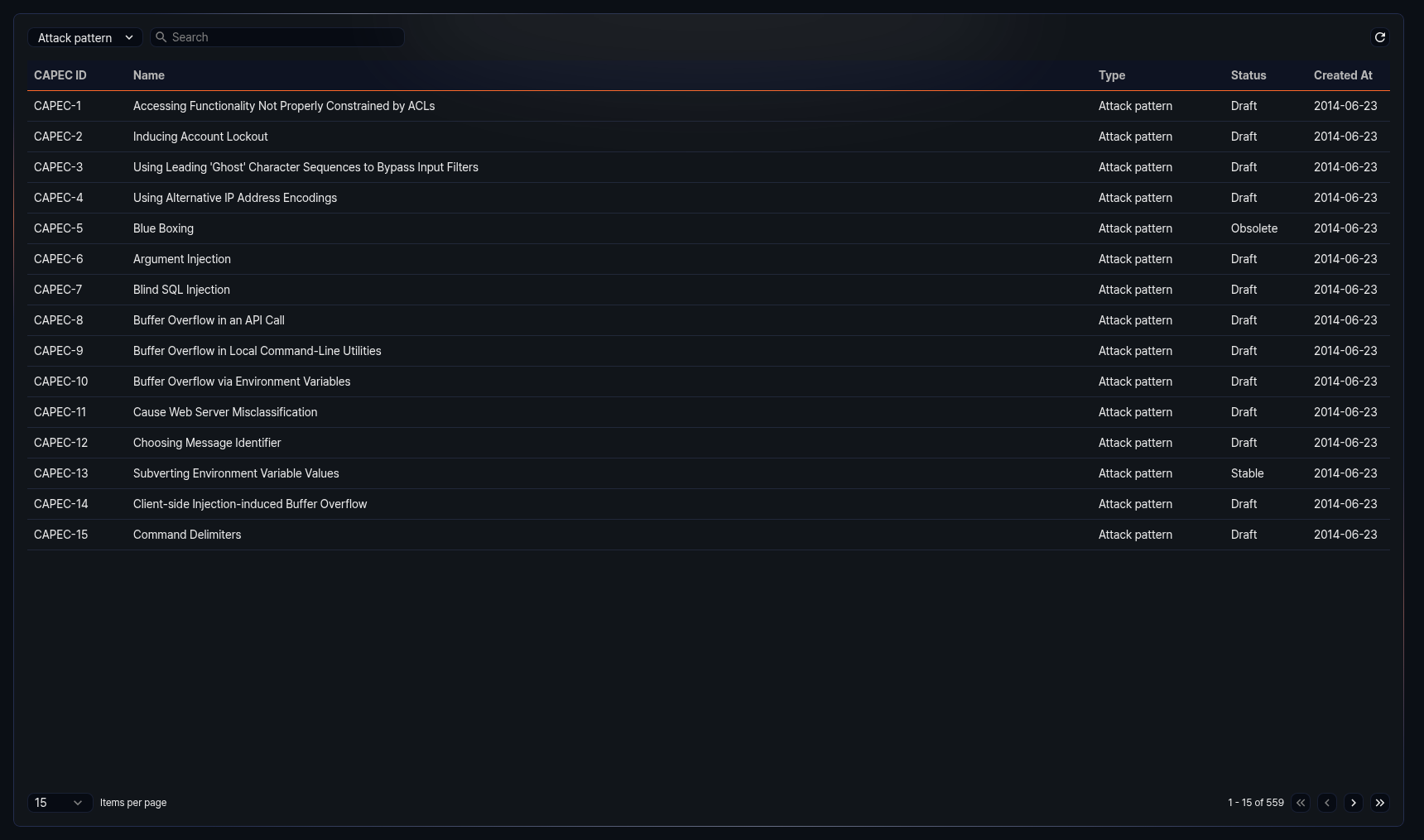
The CAPEC list displays the following information:
- CAPEC ID: Unique identifier of the CAPEC entry (e.g., CAPEC-1)
- Name: Name of the CAPEC entry
- Type: Type of the CAPEC entry
- Attack pattern: Defines a specific attack pattern. Includes detailed information such as execution methods, prerequisites, and mitigations.
- Category: Groups attack patterns based on common attributes.
- View: A structured collection of attack patterns organized by a specific perspective or purpose.
- Status: Current status of the CAPEC entry
- Draft: The entry is in draft status and has not yet been fully reviewed.
- Stable: The entry has been reviewed and is in a stable state.
- Incomplete: Core information for the entry has not yet been fully written.
- Deprecated: The entry is no longer valid or has been replaced by another entry.
- Obsolete: The entry has been retired and is no longer in use.
- Created: Date the CAPEC entry was created (yyyy-MM-dd format)
Select Attack pattern, Category, or View from the type dropdown at the top of the list to display only CAPEC entries of that type. The default is Attack pattern.
Enter a keyword in the search field at the top of the list to filter CAPEC entries containing that keyword.
Refreshing the list
To refresh the CAPEC list with the latest information, click Refresh at the top of the list.
CAPEC details
Click a specific row in the CAPEC list to open the detail panel on the right side of the screen.
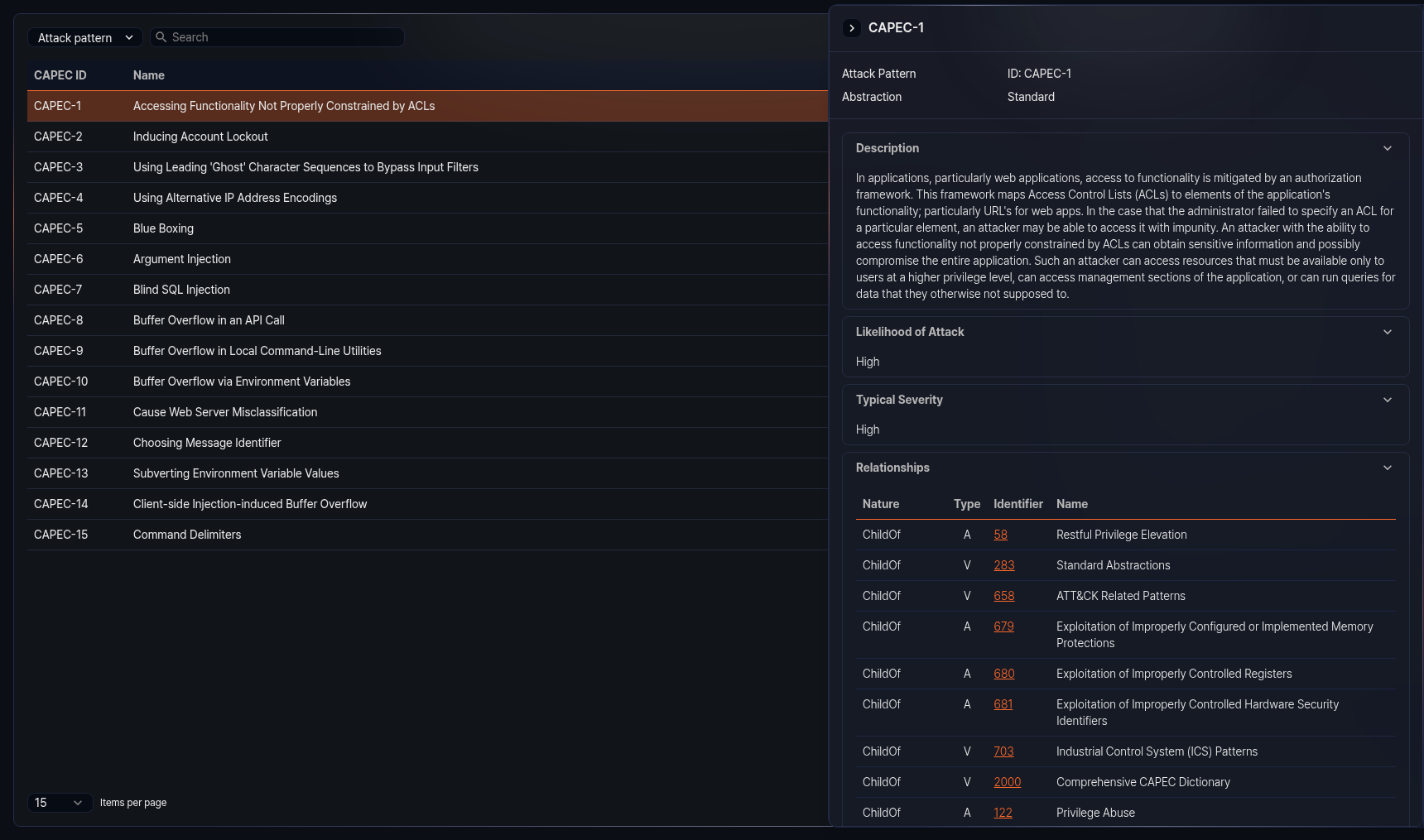
The detail panel displays the following information depending on the type of the CAPEC entry. Each section can be collapsed or expanded by clicking its heading.
Basic information
The following basic information is displayed at the top of the detail panel:
- Type: One of Attack Pattern, Category, or View
- ID: Unique identifier of the CAPEC entry
- Abstraction: Abstraction level of the attack pattern (e.g., Meta, Standard, Detailed). Displayed only for the attack pattern type.
Summary
A summary description of the CAPEC entry. Displayed primarily for the category type.
Objective
The objective that the CAPEC entry aims to achieve. Displayed primarily for the view type.
Filter
The filter criteria that determine which entries are included in a view-type CAPEC entry.
Description
A description of the CAPEC entry.
Extended description
Additional detailed description of the CAPEC entry. Contains more specific information than the description section.
Likelihood of attack
The likelihood level that the attack will actually occur. Displayed for the attack pattern type.
Typical severity
The typical severity level when the attack succeeds. Displayed for the attack pattern type.
Relationships
Displays relationship information with other CAPEC entries related to the current entry.
- Related attack patterns table: Displays the list of attack patterns in parent/child relationships in table format. The table includes the nature, type, ID, and name columns. Click an ID to navigate to the corresponding CAPEC detail page.
- Member tree: Displays the subordinate member structure of category or view-type CAPEC entries in tree format. Click a node in the tree to navigate to the corresponding CAPEC detail page.
Execution flow
Displays the step-by-step execution flow of the attack. Each step includes a step name, description, and list of related techniques. Displayed for the attack pattern type.
Prerequisites
A list of preconditions that must be met for the attack to be carried out. Displayed for the attack pattern type.
Skills required
Displays the skills required to carry out the attack and their levels. Displayed for the attack pattern type.
Resources required
A list of resources required to carry out the attack. Displayed for the attack pattern type.
Indicators
A list of indicators that suggest the attack is in progress or has succeeded. Displayed for the attack pattern type.
Consequences
Displays the consequences that occur when the attack succeeds. Provided in table format with scope, impact, and likelihood columns.
Mitigations
A list of countermeasures against the attack.
Example instances
Displays real-world attack examples. If a related CVE exists, the CVE ID is displayed as a link. Click it to navigate to the corresponding CVE detail page.
Related weaknesses
Displays the list of CWE (Common Weakness Enumeration) entries related to the CAPEC entry. Provided in table format with CWE ID and weakness name columns. Click a CWE ID to navigate to the corresponding CWE detail page.
Taxonomy mappings
Displays mapping information between the CAPEC entry and external classification systems (such as OWASP, WASC). Includes entry ID and entry name.
References
A list of external reference documents related to the CAPEC entry. Includes reference ID, section name, and URL.
View metrics
Displayed for view-type CAPEC entries. Provides the number of weaknesses, categories, and views included in the view, as well as the total number of CAPEC entries, in table format.
Content history
Displays the change history of the CAPEC entry. Consists of the following subsections, each of which can be collapsed or expanded:
- Submissions: Initial submission date, submitter, and organization
- Contributions: Contributor's contribution date, name, organization, and contribution details
- Modifications: Modification date, modifier, organization, and modification details
- Previous entry names: History of entry name changes and change dates
The Page last updated date is displayed at the bottom of the detail panel.