
Lifecycle
For an overview of the data lifecycle, refer to Data lifecycle. The lifecycle can be viewed and configured under Settings > Cluster > Life Cycle.
Only cluster administrators can use this menu.
Important considerations
Before applying the lifecycle to the Logpresso Cluster, be aware of the following:
Use the Same Storage URI for All Data Nodes
Hot storage utilizes the local directory of each node, so no URI is required. For Warm and Cold storage, which are identified by mount points specified in URI format, all nodes must use the same mount point (URI).
It is Recommended to Use Storage of the Same Capacity for All Data Nodes
Ensure that all nodes storing data utilize local storage of the same capacity. If the storage capacities of the data nodes do not match, unexpected rollovers may occur at unspecified nodes in response to storage exhaustion, leading to persistent discrepancies in storage usage across nodes.
Do Not Specify the Same Shared Path for Warm Storage URIs of Nodes A/B
Nodes A and B, which form a node pair, rollover data from Hot to Warm independently. This means that each node manages its data individually. If both nodes use the same shared path, data integrity issues or loss may occur. Therefore, nodes A and B must be configured to use different shared paths.
Below is an example of setting up mount points and shared paths in the operating system based on NFS (configuration of the NFS server, mounting methods, etc., are omitted).
| Node Pair | Node ID | NFS Mount Point (Storage URI) | NFS Shared Path |
|---|---|---|---|
| d1 | Node A: d1a | /opt/logpresso/storage/warm | 192.0.2.3:/srv/nfs4/d1a |
| d1 | Node B: d1b | /opt/logpresso/storage/warm | 192.0.2.3:/srv/nfs4/d1b |
| d2 | Node A: d2a | /opt/logpresso/storage/warm | 192.0.2.3:/srv/nfs4/d2a |
| d2 | Node B: d2b | /opt/logpresso/storage/warm | 192.0.2.3:/srv/nfs4/d2b |
The Cold tier does not support redundancy, so it is acceptable for nodes A and B to use URIs pointing to the same shared path. In other words, in the Cold tier, having data consolidated in one location does not affect system operation.
Do Not Change Storage URI After Defining the Lifecycle
Do not arbitrarily change the storage path or URI after defining the lifecycle. Changing the path during cluster node operation will result in new data being stored at the modified path, while data that existed at the previous path will not be retrievable using query commands.
Manage Maximum Storage Capacity
Each node has a local storage exhaustion response feature based on local settings. The Storage management feature periodically checks the capacity of the volume containing the data storage directory. If the available space falls below a specified threshold, the system will automatically delete older data or, if necessary, stop data collection to prevent storage overflow.
To prevent the storage usage from reaching the minimum free space of the node, set the lifecycle's Maximum storage capacity to a value lower than the threshold allowed by local storage management.
Implementation strategy
When first introducing the storage lifecycle, continuous rollovers may place a load on the system, so it is advisable to implement it in the following manner:
- Schedule the rollover during late-night hours to avoid impacting regular security operations, and increase the bandwidth limit during the rollover.
- The rollover schedule and bandwidth limit can be set in the storage screen.
- The initial bandwidth limit is 40MB/s.
- After data has been appropriately rolled over, reduce the bandwidth limit.
- Set a longer data retention period for the storage tiers and gradually decrease it.
- Changing the retention period to the target schedule from the outset when a large amount of data is stored can significantly extend the time required for the initial rollover.
- For example, if there is data stored in the Hot tier for 30 days and the target retention periods are 10 days for Hot and 180 days for Warm, it is advisable to sequentially reduce the Hot tier retention period from 25 days on the first day, to 20 days on the second day, to 15 days on the third day, and to 10 days on the fourth day.
Manage lifecycle
View lifecycle
The following illustration shows an example of a cluster with all three tiers — Hot, Warm, and Cold — configured. Tiers that are defined in the lifecycle display status information, while tiers that are not defined show a message such as Hot tier storage not available along with the Set up button.
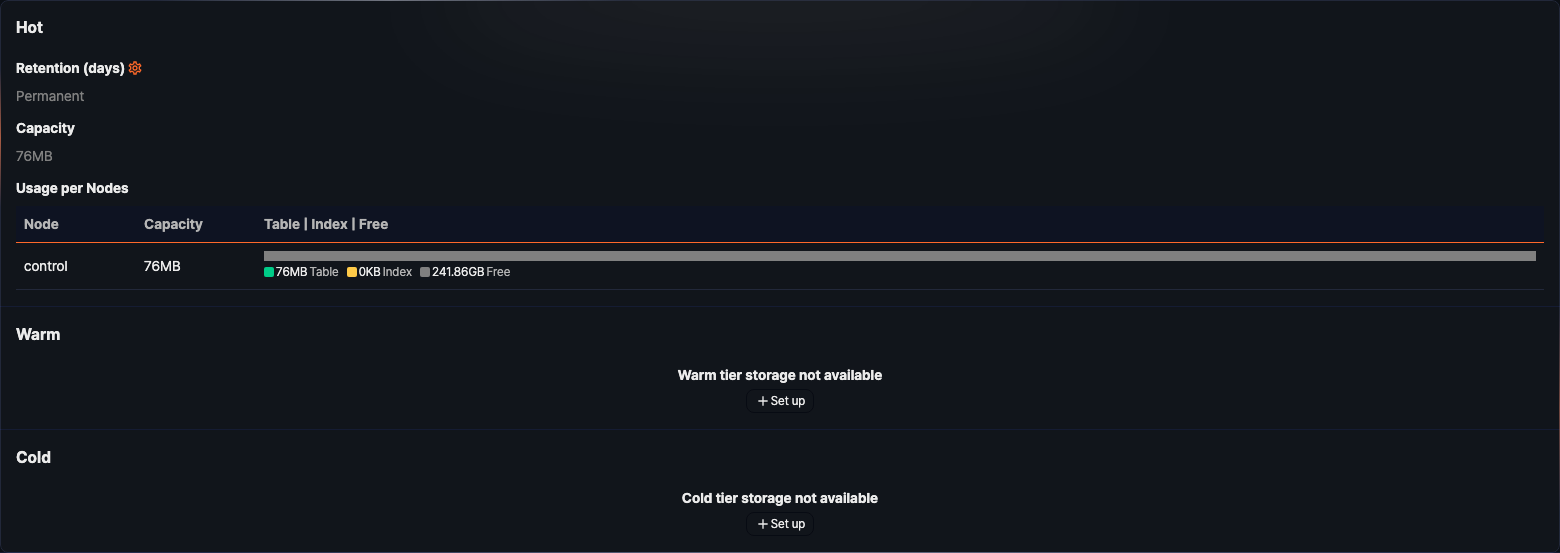
- Base path (URI): The base path or mount URI of the Warm and Cold tier storage is shown at the top of the tier's section. This item is not shown for Hot, which uses the node's local directory as-is.
- Retention (days): Duration for which data is retained in storage. Whichever enabled tier is currently the lowest one shows Permanent unless a retention period is set — this is not specific to the Cold tier; if only Hot is configured, Hot can show Permanent instead.
- Capacity: Volume of data stored in the storage tier. When a Maximum storage capacity is set for the tier, this shows the used amount, the total capacity, and the usage rate together (for example, 7.38GB / 12.00GB (61.54%)); otherwise (unlimited) it shows only the used amount.
- Usage per Nodes: Capacity used by each node pair in the storage tier. For the Cold tier, the node column is not shown — the tier shows a single row for the shared storage's usage.
- Node: Name of the node pair (not shown for the Cold tier)
- Capacity: Total volume of data stored in each node pair
- Table: Volume of data table
- Index: Volume of data index
- Free: Unused capacity
Set lifecycle
To define the lifecycle for each storage tier:
-
Click Set up in the property area for a tier that is not yet configured (Hot, Warm, Cold). For a tier that is already configured, click the
 icon next to Retention (days).
 -
In the Hot/Warm/Cold window, enter the lifecycle properties and click Save. This window shows the retention period fields for every currently enabled tier together.
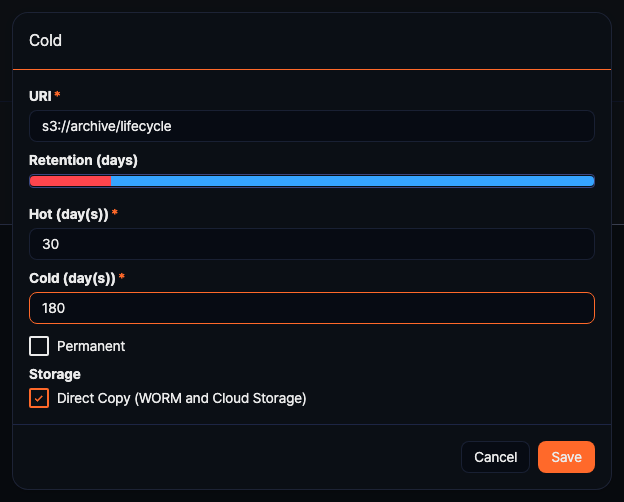
- URI: Mount path or URI of the storage
- Hot: Local storage that is defined by the
DATADIRvariable when installing Logpresso Sonar; this is not displayed during configuration. - Warm: Enter as a file path (e.g.,
/opt/logpresso/storage/warm) or in URI format (e.g.,file:///opt/logpresso/storage/warm). - Cold: Enter as a file path (e.g.,
/opt/logpresso/storage/cold) or in URI format (e.g.,file:///opt/logpresso/storage/cold,s3:///). To use object storage, first configure the Object Storage Profile.- Object storage can only be used in the Cold tier.
- KakaoCloud Object Storage also uses
s3:///as its URI.
- Hot: Local storage that is defined by the
- Retention (days): The retention period entered for each tier is shown as a colored bar with a date range at the top of the window. Each tier's own input field (labeled Hot (day(s)), Warm (day(s)), or Cold (day(s))) accepts a range of 1-9999 days. Whichever enabled tier is currently the lowest one can enable the Permanent option, which disables that field.
- Data that exceeds the retention period will be rolled over to the lower tier.
- The retention period of the upper tier must be specified before setting the retention period of the lower tier.
- Storage: Checking the Direct Copy box (labeled Direct Copy (WORM Storage) for Warm and Direct Copy (WORM and Cloud Storage) for Cold; default: unchecked for Warm, checked for Cold) prevents the creation of temporary files during rollover, directly copying files to the target storage. Use this when rolling over to WORM or cloud storage. This option is not available for the Hot tier.
If you enter a URI that cannot be saved, The URL is invalid. Make sure the URL is correct and try again. is shown. If you enter an object storage URI (starting with
s3://) for the Warm tier, a separate validation message is also shown below the field stating that object storage cannot be used for the Warm tier. - URI: Mount path or URI of the storage