
Data catalog
Overview
Log schemas and tables are closely related, but standard users cannot access log schemas directly, which made query authoring difficult. Data Catalog lets users without administrator privileges review the relationship between log schemas and tables. You can open it from Analysis > Data Catalog, and Cluster Administrator, Administrator, and User can all access it.
The relationship between a table and its log schemas comes from the collection settings. The log schemas that the logger model of a logger writing to a table references in its normalization rules are the log schemas related to that table. Data Catalog lets you browse this relationship in both directions. You can review the list of tables that use a specific log schema, or review the log schemas related to the tables you are allowed to view. Because you can easily see structural information such as the field types, names, and display names that make up a log schema, it helps you decide what data to process in Logs or Queries to obtain meaningful results.
Screen layout
The Data Catalog screen consists of a navigation panel on the left and a main area on the right. The navigation panel has a switch and two lists stacked vertically, and the main area shows either the field structure of a log schema or table data depending on what you select.
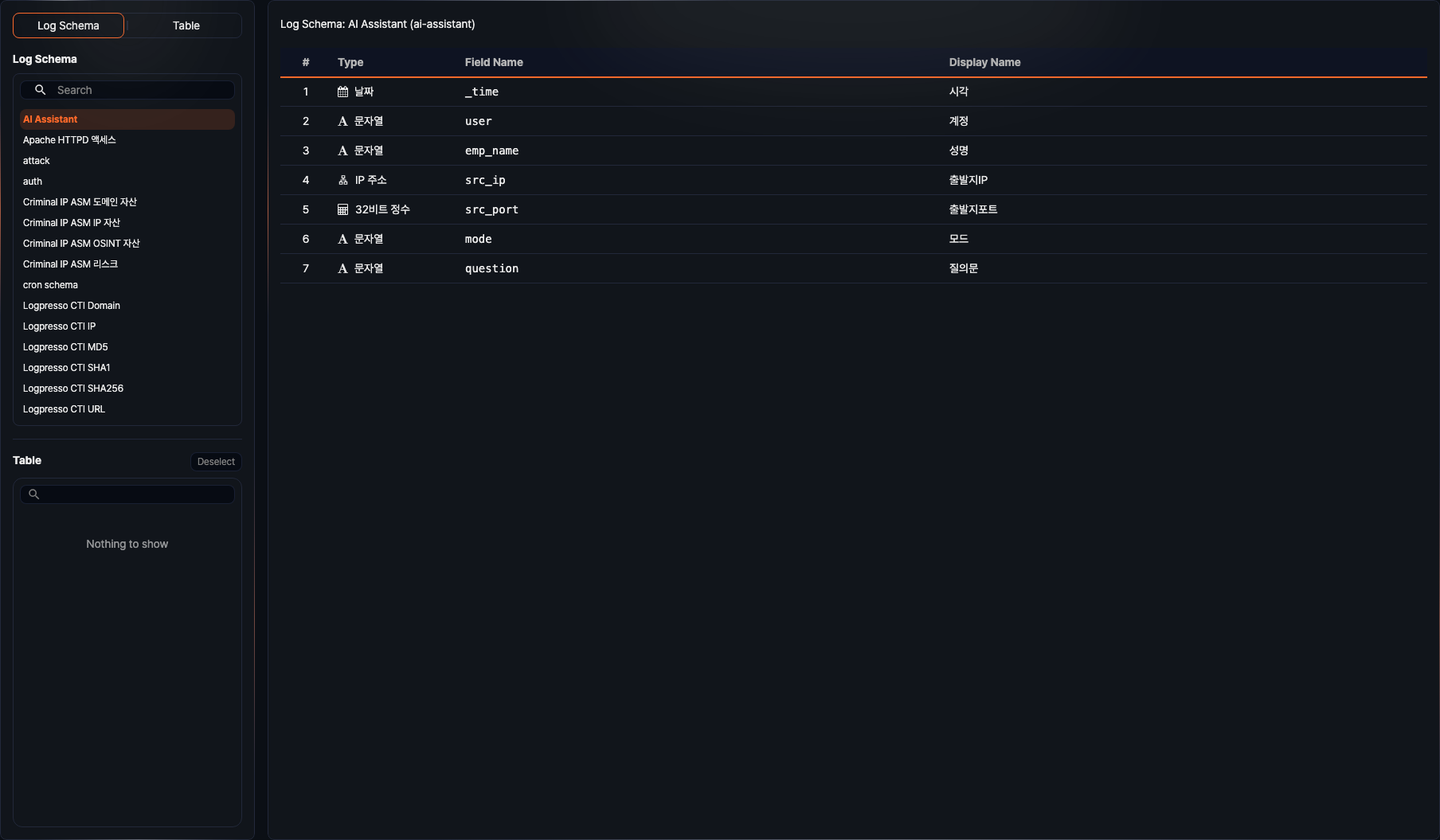
- Switch: Chooses whether to browse by Log Schema or Table. Switching the mode resets the current selection.
- Upper list: The list of items for the selected browsing mode. The log schema list provides a search box to filter by name, code, or description and loads more items when you scroll to the end. The table list is shown as a table group tree with All at the top, and the tree has a built-in search box to find a table. Click the arrow in front of a group to expand or collapse it.
- Lower list: The items related to the item selected in the upper list. If you selected a log schema, the tables that use the schema are shown; if you selected a table, the log schemas related to the table are shown. Click Deselect or press the Esc key to clear the selection in the lower list and return the main area to the item selected in the upper list. The button is enabled only after you select an item in the lower list.
- Resizing the lists: Drag the divider between the two lists up or down to adjust their heights.
- Resizing the panel: Drag the divider between the navigation panel and the main area left or right to adjust the panel width. Dragging it all the way collapses the panel, and clicking the expand button left on the collapsed panel expands it again.
- Path: The top of the main area shows the current selection as "Log Schema: name (code)" or "Table: name". When you also select an item in the lower list, both items are shown joined by an arrow. Click the first item to clear the selection in the lower list.
- Field table: When you select a log schema, the schema description and a table of the number, type, field name, and display name of each field are shown.
- Data grid: When you select a table, up to 10,000 records stored in the table are loaded and displayed. While browsing by log schema, the data is normalized with the selected log schema; while browsing by table, the original data is shown. Click the
 icon above the grid to reload the data.
 - Filter: Click Add above the data grid to add field conditions and view only the records you want, and click Reset filter to remove all added conditions. Filter conditions are written the same way as the filter feature in Logs.
- Page size and pagination: Adjust the number of records shown at once and the current page at the bottom of the grid.
If nothing is selected, the main area shows "No items are selected." If you select a table you are not allowed to view, it shows "Read permission required."
Browsing tables by log schema
Select Log Schema in the switch to show the log schemas in the upper list; the first log schema is selected automatically. When you select a log schema from the list, the main area shows the field table of that schema, and the lower list shows the tables related to the log schema.
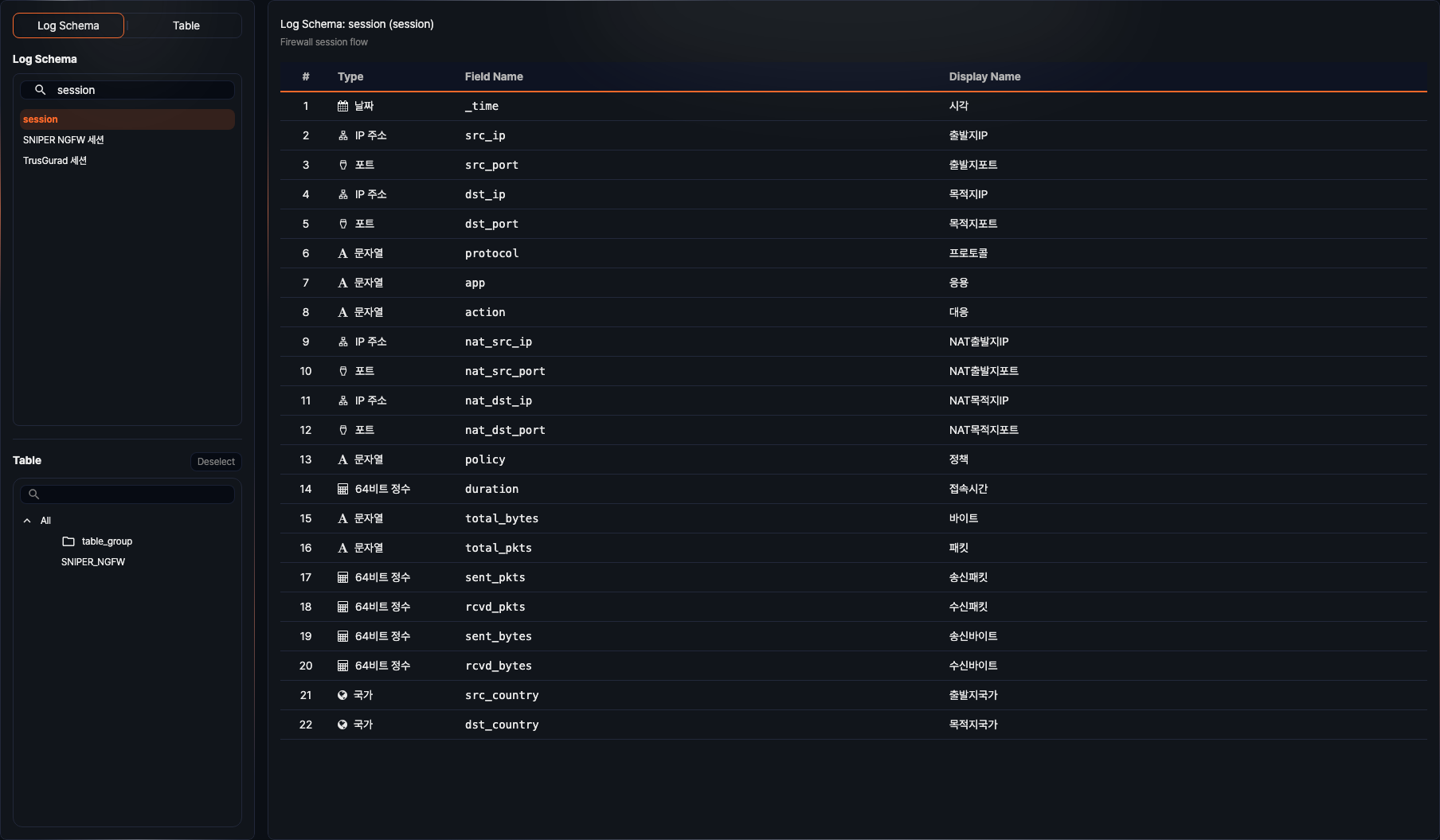
- The log schema name in the list and the display name in the field table are shown in the translation registered in the log schema for the signed-in user's language setting, or in the registered name when no translation exists. The path uses the registered name, and the log schema code and field names do not depend on the language.
- The table list shows, as a group tree, only the tables that use the selected log schema and that you have permission to view. Groups with no matching tables are still shown in the tree.
- Type a search term in the log schema search box to narrow the list to the log schemas whose name, code, or description contains the text.
When you select a table from the table list, the main area changes to a data grid that shows the data stored in the table normalized with the selected log schema.
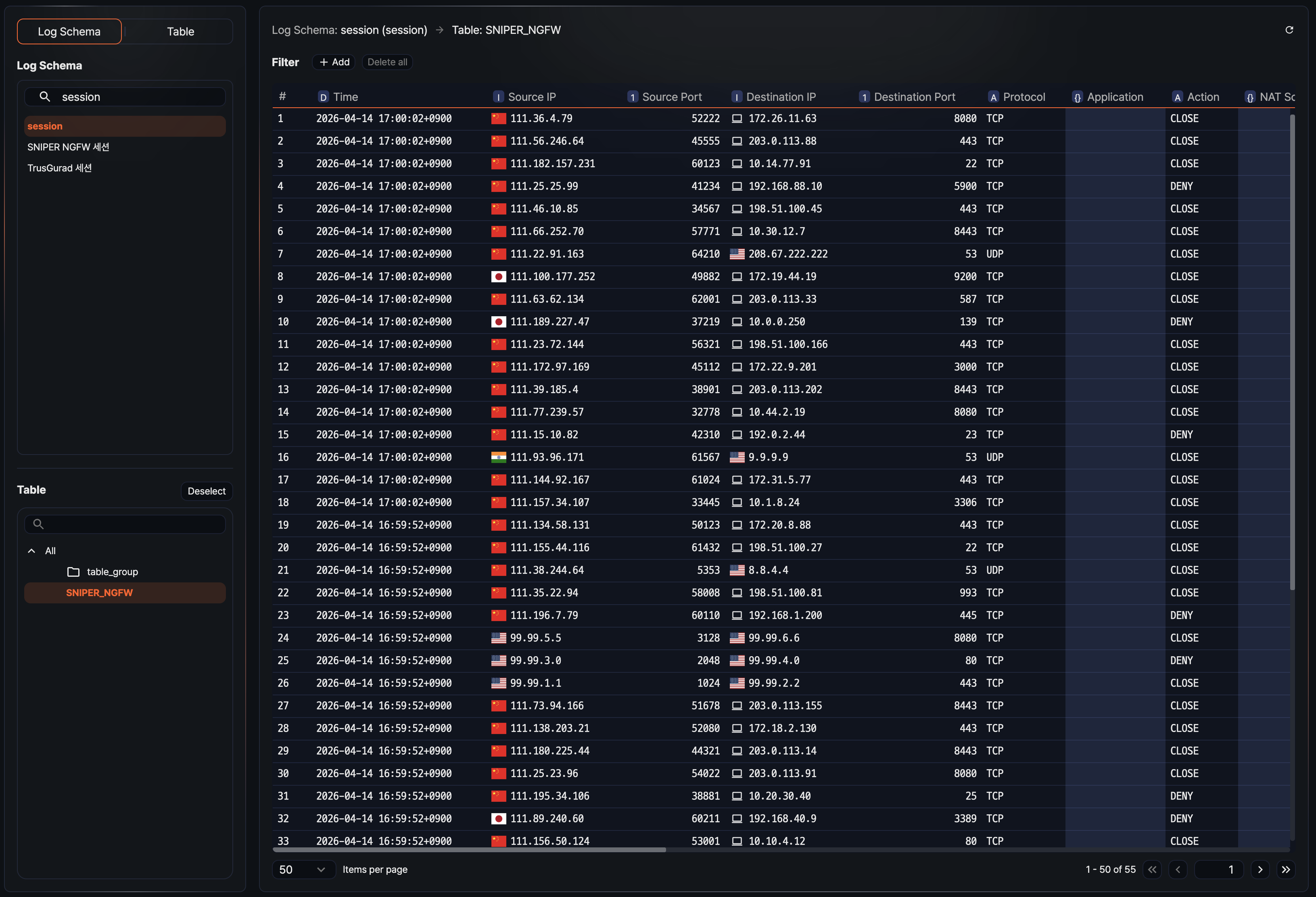
- The path shows "Log Schema: name (code) → Table: name". Click the log schema item to clear the table selection and return to the field table.
- The columns of the data grid are labeled with the display names of the log schema fields. Columns for fields the logger did not store are empty.
- Click the icon at the top to reload the data of the selected table.
- Click Add next to Filter to set conditions based on field values and narrow down to the data you want.
- Change the number of records shown at once or move between pages at the bottom of the grid while reviewing the information.
Browsing log schemas by table
Select Table in the switch to show the tables you have permission to view as a group tree in the upper list. Nothing is selected at first, so the main area shows "No items are selected." When you select a table in the tree, the main area shows the original data stored in that table, and the lower list shows the log schemas related to the table.
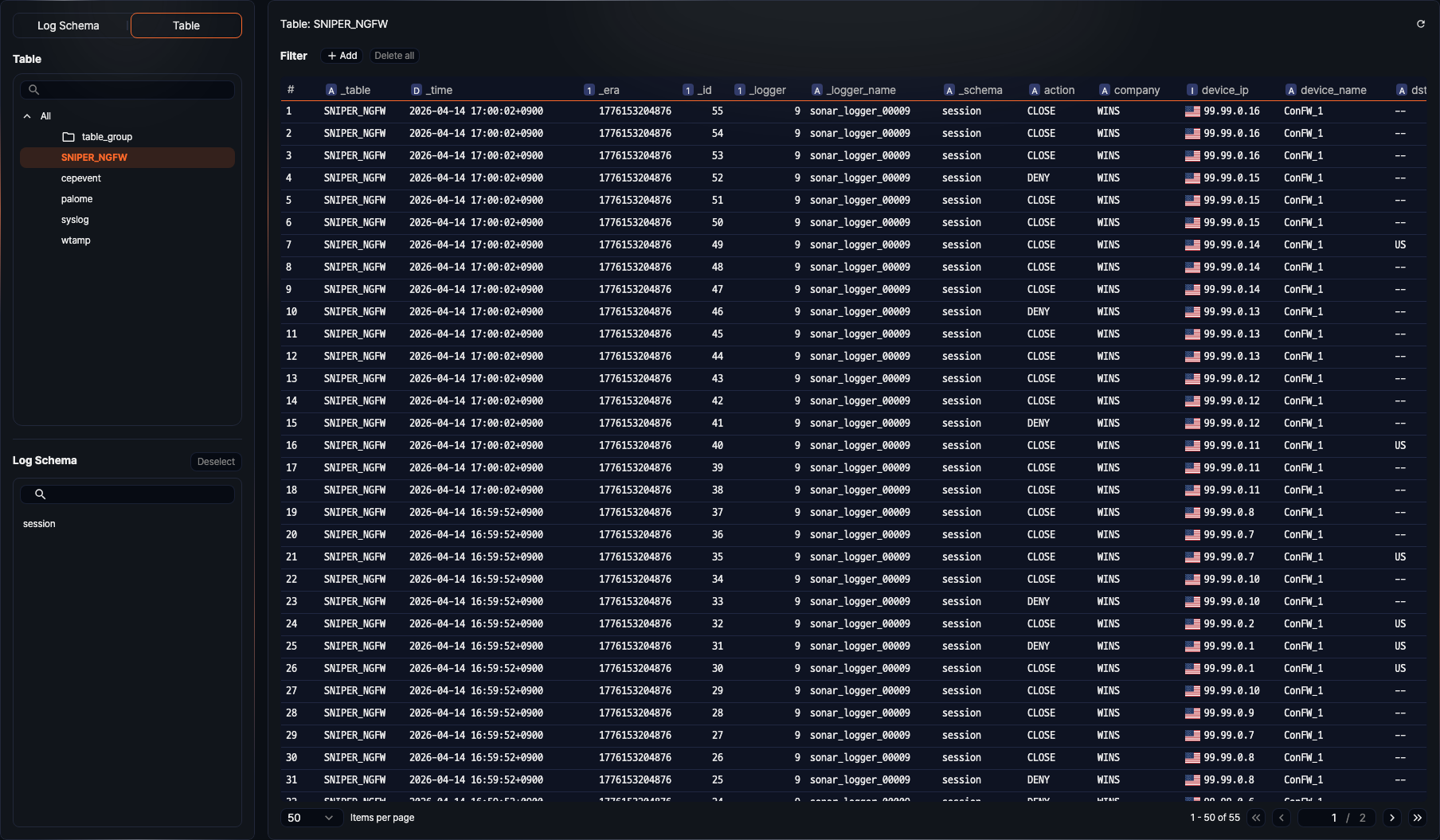
- The original data grid shows the stored field names as they are, without normalization. Refresh, filter, and pagination work the same way as when browsing by log schema.
- The log schema list shows only the log schemas referenced by the logger model of the loggers writing to the selected table. A single table can be linked to one or more log schemas.
- Use the search box above the log schema list to narrow the list by name, code, or description.
When you select a log schema from the log schema list, the main area changes to the field table of that log schema.
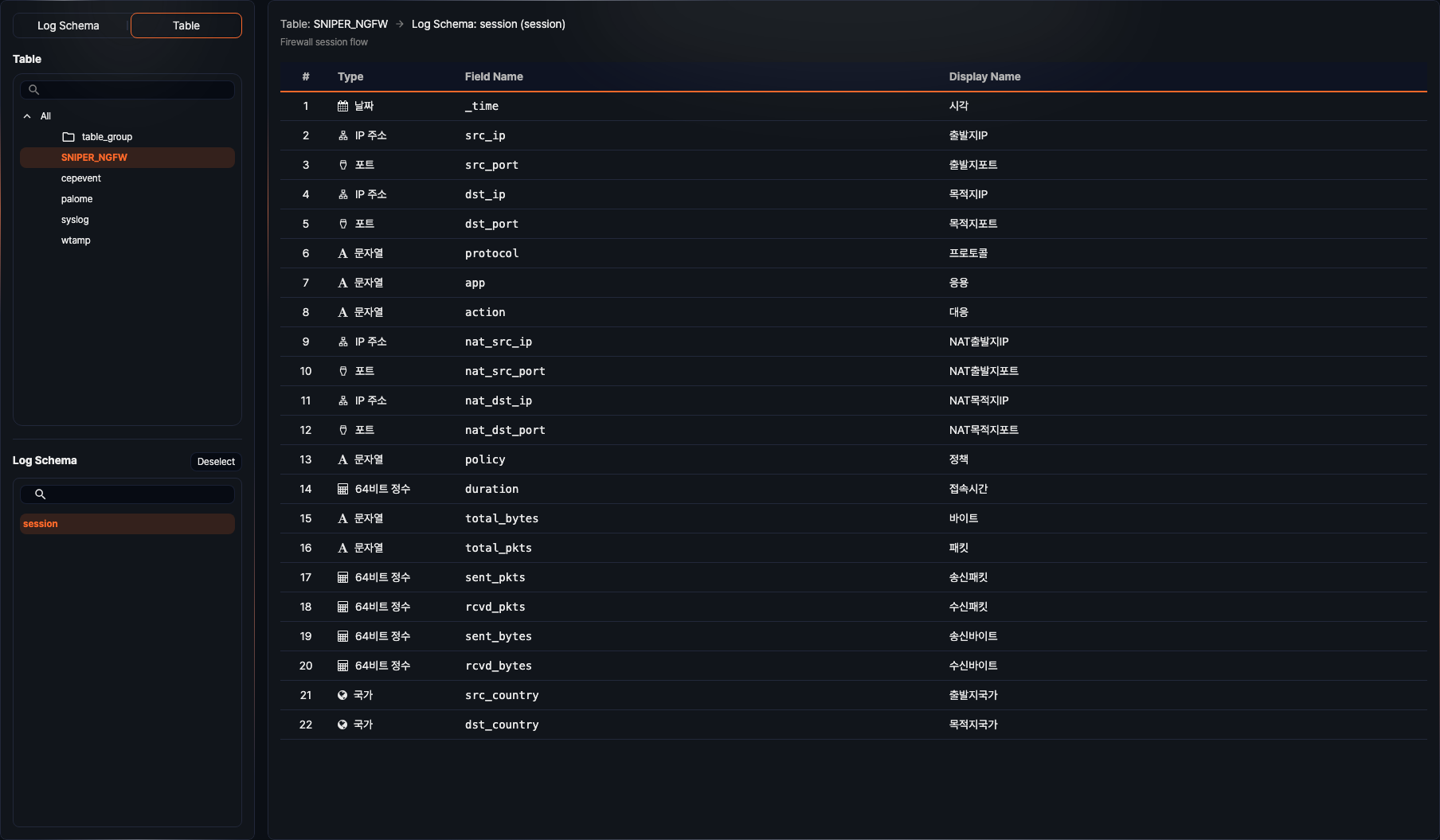
- The path shows "Table: name → Log Schema: name (code)", and the log schema description is shown above the field table.
- The field table lists the number, type, field name, and display name of each field in the defined order.
- Click Deselect or press the Esc key to clear the log schema selection and return to the original data grid.
Using Data Catalog
- Browse the table list by log schema to see which tables a specific log schema is applied to.
- Browse the log schema list by table to review the log schemas applied to a table and the field information of each schema.
- Understand data structure and flow in advance to quickly find the information needed for writing queries, reviewing logs, and processing data.