
Investigate Result
This task executes a query and adds the results as an investigation result to a ticket. Use it to attach relevant logs or data to a ticket so you can record and analyze an incident when a security incident or anomaly is discovered. For example, you can add logs of suspicious activity originating from a specific IP address.
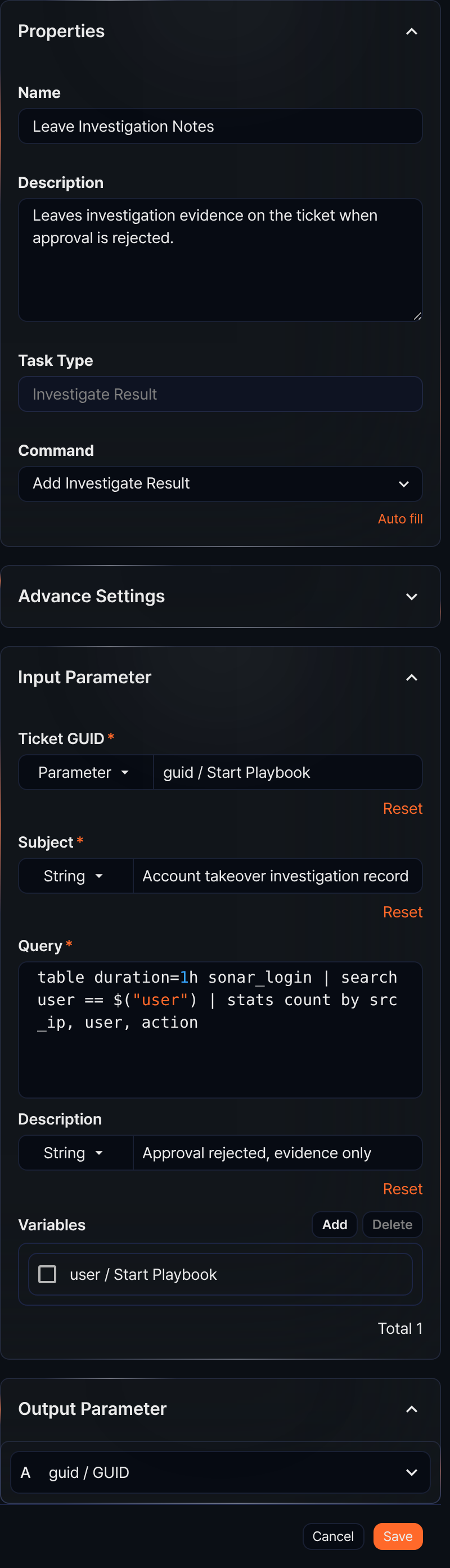
- Command
- The only available command is Add Investigate Result.
- Input parameters
- The input parameters for the Investigate Result task are as follows:
- Ticket GUID*
-
Select or enter a parameter that holds the GUID of the ticket to add the investigation result to.
- Subject*
-
Select String and specify the subject of the investigation result, or select a parameter from the Parameter list to use as the subject.
- Query*
-
Enter the query that returns the investigation result to add. To use parameters from the Variables in the query, use the $("variable") format.
- Description
-
Select String and enter a description of the investigation result, or select a parameter containing the description string from the Parameter list.
- Variables
-
Click Add and select variables from the parameter list to use in the query. The parameter list shows parameters passed by preceding tasks or playbook input parameters. To use a variable value in the Query, use the $("variable") format.
-
To delete a variable from the variable list, select the checkbox in the variable row and click Delete.
When this task completes, the GUID of the created investigation result is returned in the output parameter guid.