Mail server
Overview
In Settings > Mail Server, you can register and manage the SMTP server that Logpresso Sonar will use to send emails. Only cluster administrators can use this menu. It does not appear for the Administrator and User roles.
Features requiring mail server configuration
The mail server must be configured to utilize the following features:
- Send explanation request emails
- Ticket propagation
- Send emails to the accounts designated in the alarm groups
- (Playbook) Send notification emails for approval requests
- (Playbook) Send report file via email
- (Playbook) Send email
- (Login Screen) OTP authentication screen to request a 2FA reset from the administrator
- (Login Screen) Send the email authentication code
- sendmail query command
Configure SMTP server
Specify the following properties and click Save.
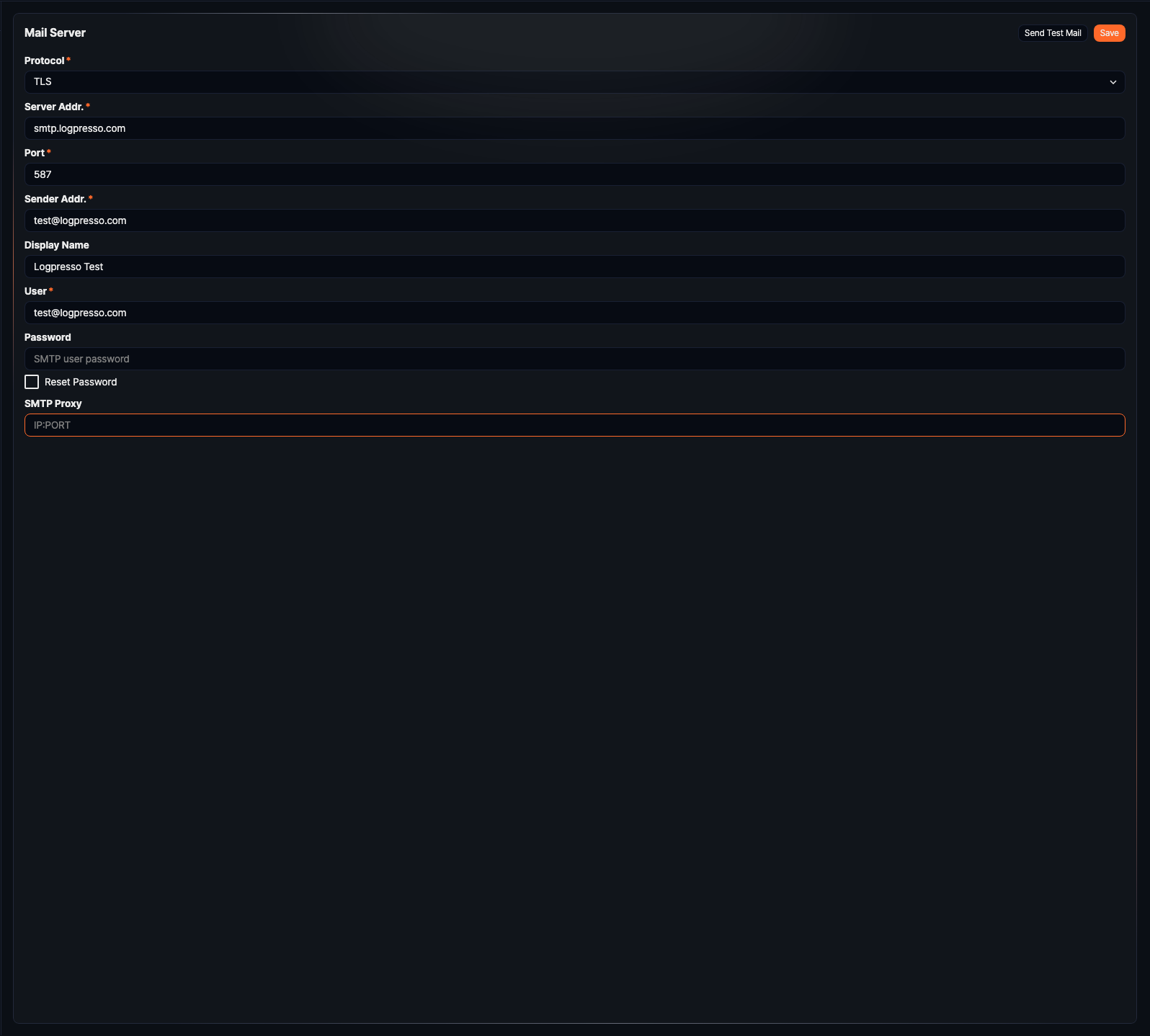
- Protocol (required): Email transmission protocol (default: TLS). Choose one of the following:
- PLAIN: Unencrypted SMTP communication.
- SSL: SMTPS communication.
- TLS: SMTP over TLS (STARTTLS) communication.
- Server Addr. (required): Address of the SMTP server. You can enter up to 253 characters.
- Port (required): TCP port for SMTP communication (range: 0-65,535, default: 587).
- Sender Addr. (required): Email address of the sender. It must be a valid email address.
- Display Name: Display name of the sender. You can enter up to 200 characters.
- User (required): Username for SMTP server login. It cannot start or end with a space, and you can enter up to 255 characters.
- Password: Password for SMTP server login. The server never returns a saved password, so this field always appears empty, even when a password is already stored. Leaving it empty and saving keeps the existing password unchanged, and if no password is saved, the server connects without SMTP authentication. To clear the password, select Reset Password and save. You can enter up to 127 characters.
- SMTP Proxy: Address of the proxy server used to reach the mail server (format
IP:PORT, optional). You can enter up to 255 characters.
Send a test email
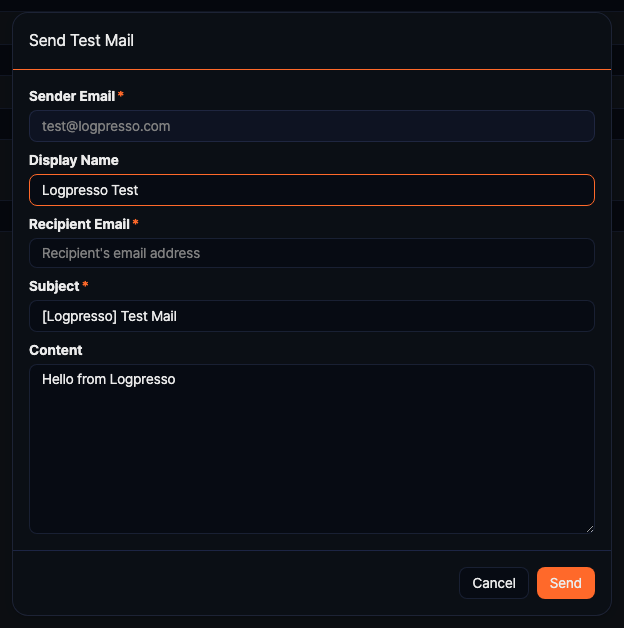
The Send Test Mail button is activated whenever Server Addr. is saved. The first time you configure the mail server, the button activates after you save the settings.
If you changed any settings, save them first before testing. The test email connects with the saved server settings; only the sender address and display name come from the dialog.
Clicking Send Test Mail opens the Send Test Mail dialog.
- Sender Email: The sender address from the configuration screen. You cannot change it here.
- Display Name: Filled in from the configuration screen, but you can change it for this email only.
- Recipient Email (required): Enter an address and press Enter to add it. You can add more than one address.
- Subject (required), Content: Prefilled with default text, which you can edit.
Click Send to deliver a test email to the specified address. If the send fails, a notification appears and the dialog stays open. After configuring the mail server, always send a test email to confirm that it works correctly.