
CWE
Overview
CWE (Common Weakness Enumeration) is a classification system for software and hardware security weaknesses maintained by MITRE. Using industry-standard CWE identifiers, you can systematically classify and manage security weaknesses. Logpresso Sonar includes a built-in CWE database, enabling you to quickly look up and analyze the root causes (weaknesses) associated with CVE vulnerabilities.
CWE connects with other security feed data as follows:
- In the CVE detail view, you can check the CWE entries associated as root causes of a vulnerability.
- In the Related attack patterns section of the CWE detail view, you can check the CAPEC attack patterns that exploit the weakness.
CWE entries are classified into the following three types:
- Weakness: Defines an individual security weakness that can occur in software or hardware.
- Category: A classification group that bundles multiple weaknesses based on common characteristics.
- View: A subset of weaknesses selected and presented according to a specific perspective or purpose.
The CWE menu is read-only and does not provide add, edit, or delete functionality. It is available to accounts with the User role or above.
Browsing and searching the CWE list
You can browse or search the CWE list under Intelligence > CWE.
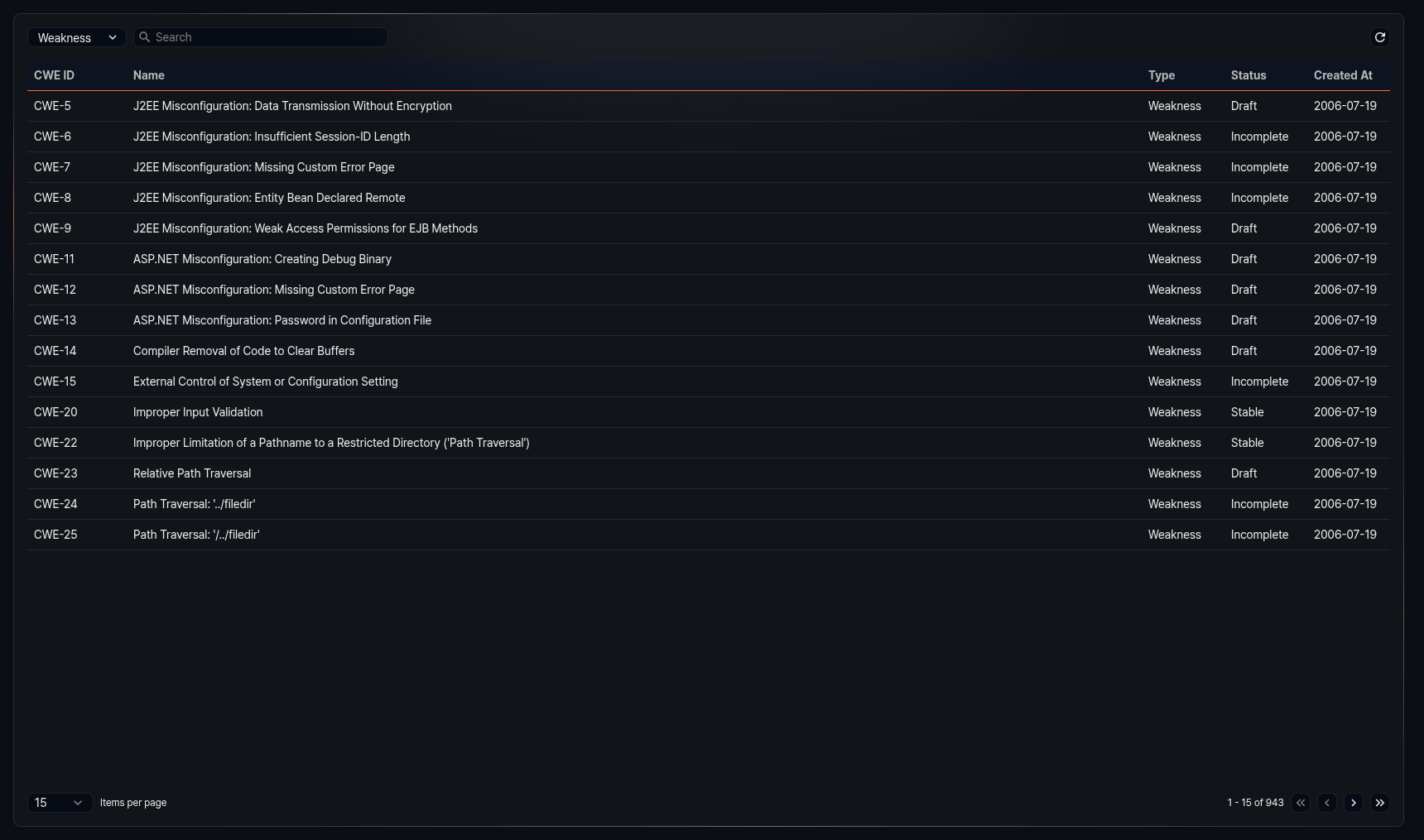
The columns displayed in the list are as follows:
- CWE ID: Unique identifier of the CWE entry (e.g., CWE-79)
- Name: Name of the CWE entry
- Type: Type of the CWE entry (Weakness, Category, View)
- Status: Current status of the CWE entry
- Created: Date the CWE entry was registered (yyyy-MM-dd format)
Enter a keyword in the search field at the top of the list to filter CWE entries containing that keyword.
Select Weakness, Category, or View from the type dropdown at the top of the list to display only CWE entries of that type. The default is Weakness.
Refreshing the list
To refresh the CWE list with the latest information, click Refresh at the top of the list.
Viewing CWE details
Click an entry in the CWE list to open a side panel on the right displaying the detailed information for that CWE.
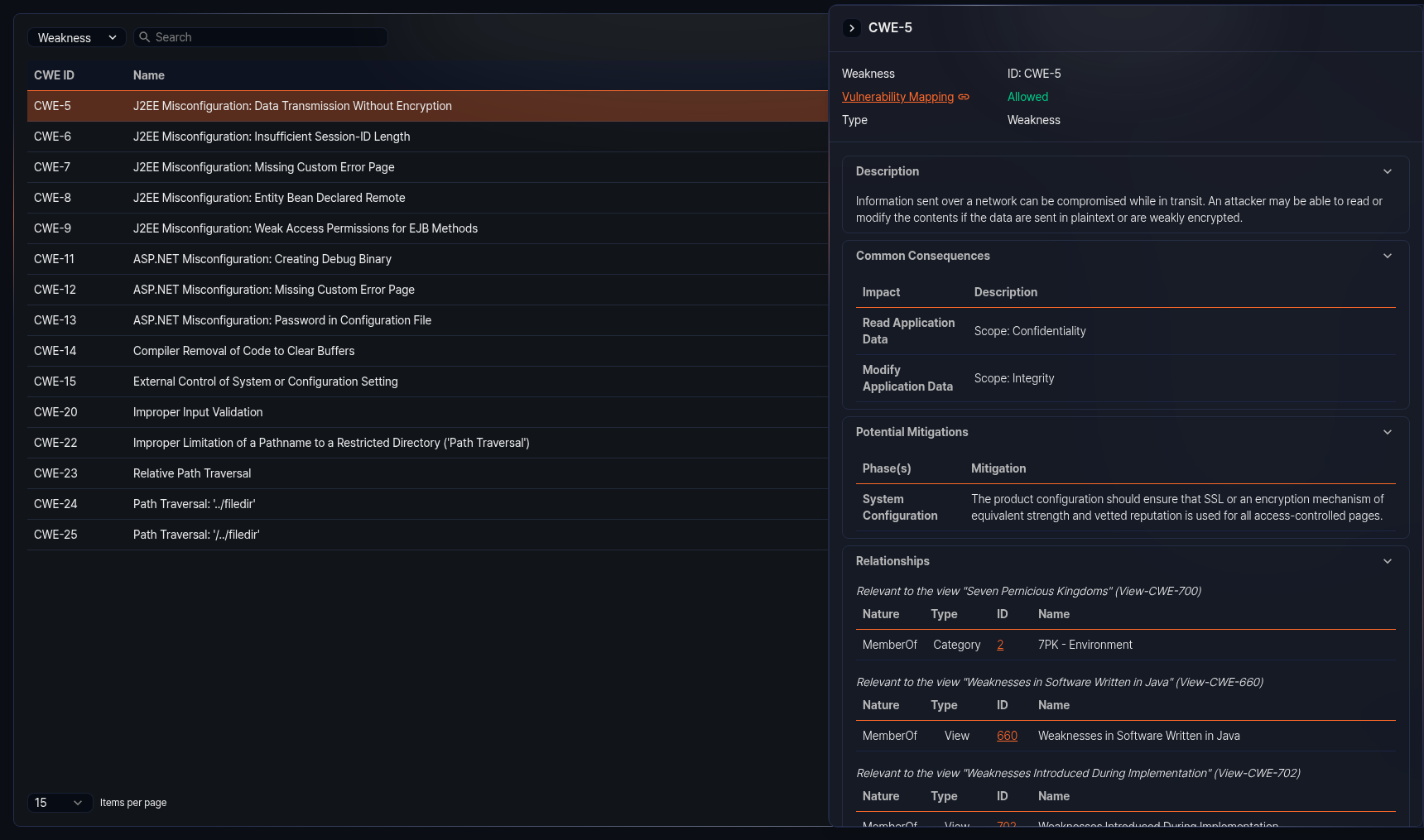
The information sections available in the detail panel vary depending on the CWE entry type and data. Sections with no data are not displayed. Click the title of each section to collapse or expand it.
Basic information
The top of the detail panel shows the CWE entry type (Weakness, Category, View) and ID. Below that, the following information is provided:
- Vulnerability mapping: Indicates whether the CWE entry can be mapped as a root cause of a CVE. Allowed means the weakness is specific enough for CVE mapping to be permitted, while Prohibited means the entry is too abstract or intended for classification purposes, so CVE mapping is not permitted. Click the value to jump to the mapping notes section below for detailed rationale.
- Abstraction: Abstraction level of the CWE entry (displayed only when data is available)
- Type: Original type of the CWE entry (Weakness, Category, View) (displayed only when data is available)
Weakness type sections
The following sections may be provided for CWE entries of the Weakness type. Each section is displayed only when data is available.
- Description: Basic description of the weakness
- Extended description: Additional detailed description of the weakness
- Alternate terms: Alternate terms and definitions used to refer to the weakness
- Common consequences: Impact and scope resulting from the weakness
- Potential mitigations: Stage-by-stage mitigation strategies and descriptions for the weakness
- Relationships: A table organizing relationships with other CWE entries by view. Each relationship shows the nature, type, ID, and name. Click an ID to navigate to that CWE entry.
- Background details: Background information about the weakness
- Modes of introduction: Stages and descriptions of how the weakness is introduced into software
- Applicable platforms: Programming languages and technologies to which the weakness applies
- Likelihood of exploit: Likelihood level of exploitation for the weakness
- Demonstrative examples: Code examples demonstrating the weakness
- Selected observed examples: List of CVEs related to the weakness. Click a CVE ID to navigate to its detail page.
- Weakness ordinalities: Priority and description of the weakness occurrence
- Detection methods: Methods, effectiveness, and notes for detecting the weakness
- Related attack patterns: List of related CAPEC entries. Click a CAPEC ID to navigate to its detail page.
Category type sections
The following additional section is provided for CWE entries of the Category type. It is displayed only when data is available.
- Summary: Summary description of the category
View type sections
The following additional sections are provided for CWE entries of the View type. Each section is displayed only when data is available.
- Objective: Purpose and goals of the view
- Audience: Target stakeholders and descriptions for the view
- Relationships: Displays CWE entries belonging to the view in a tree structure. Click each node in the tree to navigate to that CWE entry.
- View metrics: Number of weaknesses, categories, and views included in this view, along with the total number of CWE entries
Common sections
The following sections are displayed for all CWE entry types when data is available.
- Mapping notes: Mapping eligibility to CVEs, usage, rationale, reasons, and comments
- Notes: Additional notes related to the weakness
- Taxonomy mappings: Mapping information to external classification systems (taxonomy name, node ID, fitness, mapped node name)
- References: List of related external reference documents
- Content history: Change history of the CWE entry, including submission information, contributions, modifications, and previous entry names
The bottom of the detail panel shows the date the CWE entry was last updated.